1. Add the code snippet
Add a small snippet next to your existing paywall. Setup takes less than an hour.
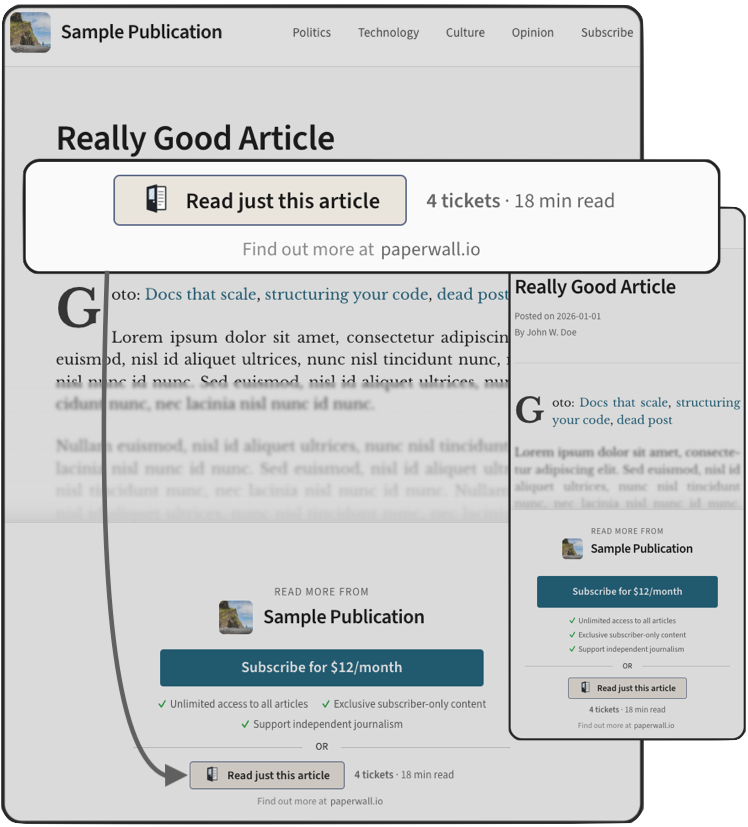
Readers pay for what they read.
Publishers get paid for every article.
Billed and paid out monthly.
Subscriptions follow when readers are ready.
Many readers arrive from a link to read one article. A subscription is more than they want, so most of them leave, and you earn nothing from the visit. Paperwall lets them pay for that one article instead.
1. Add the code snippet
Add a small snippet next to your existing paywall. Setup takes less than an hour.
2. Choose articles and prices
Select the articles that readers can unlock and set a price for each one. You can test the whole flow in sandbox mode before readers see it.
3. Receive a monthly payout
We record and reconcile each unlock. You get paid once a month, with revenue shown for each article.
Hit a paywall? No problem
You've found an article you want to read but you're not ready to subscribe. With Paperwall, you can still unlock just this article and move on.
Just pay for the article
Choose the unlock option right next to the subscription offer. No commitment, no subscription. Just the article you came for.
One wallet, many publications
Add your payment details once and unlock articles across every publication in the Paperwall network.
You get 70% of net revenue from your articles, paid monthly. Paperwall keeps 30%. You see the revenue for each article in your dashboard.
Paperwall only appears at the paywall, on the articles you choose. Your subscription flow stays the same, and you can turn Paperwall off at any time.
Any site, through the standard embed. Ghost also has its own integration. See the integration guides.
Articles typically cost between 1 to 4 tickets. A ticket is USD $0.25 or CAD $0.30, with more currencies added later. You see the price before you unlock.
Add a card once. You're charged monthly for what you unlock. No subscription.
Yes, from Claude, Cursor and other AI assistants. How it works
You can dispute a charge from your account. We resolve disputes within 48 hours.
Paperwall is in early rollout. We're looking for readers with subscription fatigue and publishers who want to capture more of their audience.
Interested in a pilot? See how unlocking looks alongside your paywall in preview mode, with no change to your live site until you're ready.